Transforming Digital Design with Bold Watercolor Photoshop Styles
In the rapidly evolving landscape of digital graphic design, the line between traditional artistry and modern efficiency continues to blur. Designers are constantly seeking tools that offer the organic, textured feel of hand-painted media without the steep learning curve or time investment required by manual techniques. This is where Bold Watercolor Photoshop Styles have emerged as an essential asset for creatives working across branding, social media, print, and web design. These styles bridge the gap between the unpredictable beauty of watercolor and the precision of vector and raster software, allowing artists to inject personality and depth into their work with unprecedented speed.
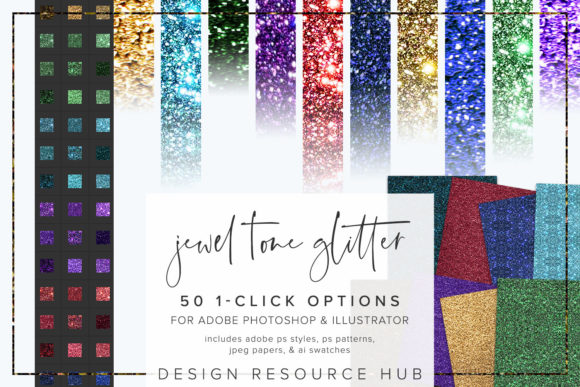
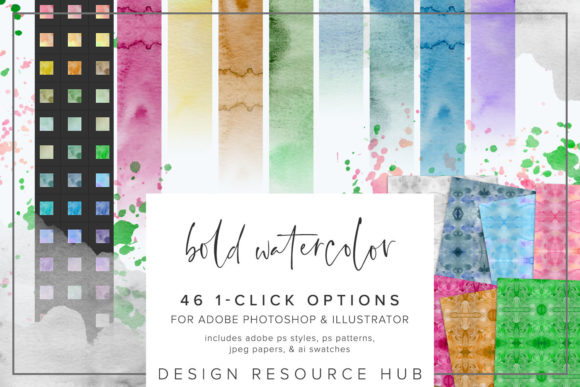
The appeal of watercolor lies in its fluidity. It is characterized by soft edges, vibrant bleeds, and a transparency that digital pixels often struggle to replicate authentically. However, mastering digital watercolor simulation can be tedious. By utilizing a curated set of Adobe Photoshop styles, designers can bypass the trial-and-error phase entirely. These one-click options are engineered for seamless integration into popular applications like Adobe Photoshop and Adobe Illustrator, making them versatile tools for a wide range of creative projects.
The Mechanics of One-Click Texturing
At their core, these styles are not just simple overlays; they are complex combinations of blending modes, layer effects, and pattern fills packaged into a single, easy-to-apply command. When you apply a style from this collection to a shape, text layer, or image accent, the software automatically calculates how light, shadow, and texture should interact with your base element. This results in a rich, multi-dimensional look that mimics the way pigment settles on cold-press paper.
The versatility of Bold Watercolor Photoshop Styles is evident in their application. Whether you are designing a wedding invitation suite, creating eye-catching typography for a poster, or adding subtle accents to a corporate logo, the ability to toggle between different textures instantly allows for rapid prototyping. You are no longer locked into a single aesthetic. Instead, you can experiment with various levels of saturation, grain, and bleed until the visual tone matches your creative vision perfectly.
What Is Included in the Package
To ensure maximum compatibility and workflow flexibility, a comprehensive style pack typically includes several file formats tailored to specific Adobe applications. Understanding what is included helps users maximize the value of their purchase:
- Adobe Photoshop .pat file: This contains the seamless patterns that form the basis of the watercolor textures. These patterns can be scaled and adjusted independently of the style effects.
- Adobe Photoshop .asl file: The primary style file. This is what you load into the Styles panel to apply the complete look—including shadows, bevels, and pattern overlays—with a single click.
- Adobe Illustrator .ai swatch file: For vector-based workflows, this file allows you to apply similar watercolor textures directly to vector shapes in Illustrator, maintaining scalability without loss of quality.
- JPEG paper files: Sized at 10 x 10 inches, these high-resolution background textures provide an authentic paper grain that can be used as a backdrop or blended with other elements to enhance the tactile feel of the design.
Streamlining Installation and Setup
One of the most significant barriers to adopting new digital assets is the complexity of installation. Fortunately, these styles are designed to be completely seamless. The process is straightforward and ensures that you can start creating within minutes of downloading the files. The single-click nature of the styles means they work at any size and on any design element, removing the guesswork from digital texturing.
For Photoshop users, installing the .asl file is done via the Styles panel. You simply navigate to "Import Styles" and load the file. Once loaded, the styles appear as thumbnails in your panel, ready to be clicked onto any selected layer. Similarly, the .pat file is installed through the Patterns menu under "Import Patterns." This separation allows advanced users to tweak the underlying pattern scale if they desire a finer or coarser grain, offering a layer of customization beyond the default settings.
Illustrator users benefit from the .ai swatch file. By opening the Swatch Library and selecting "Other Library," you can load the watercolor swatches directly into your workspace. This integration is crucial for designers who prefer working with vectors for logos and icons but still want the organic feel of hand-painted media. The ability to combine these swatches with standard Illustrator brushes further expands the creative possibilities, allowing for dynamic strokes that fade and blend naturally.
Practical Applications in Modern Workflows
The true test of any design tool is its utility in real-world scenarios. Bold Watercolor Photoshop Styles excel in environments where speed and aesthetic quality are equally important. Consider a social media manager who needs to produce daily content. Using these styles, they can quickly transform plain text quotes into visually engaging graphics by applying a watercolor splash behind the typography. The result is professional and artistic, yet it takes seconds to create rather than hours.
In the realm of branding, these styles offer a way to soften rigid corporate identities. A tech startup might use clean, sans-serif fonts but add watercolor accents to their marketing materials to appear more approachable and human-centric. The JPEG paper files included in the pack can serve as subtle backgrounds for business cards or letterheads, adding a premium, tactile quality to digital proofs before they go to print.
Furthermore, the scalability of the patterning is a critical feature. Because the patterns are seamless, they can be tiled infinitely without visible joints. This makes them ideal for large-format printing, such as wallpaper designs or fabric prints, where consistency across a large surface area is mandatory. Designers can change the scale of the patterning to suit different applications, ensuring that the texture looks appropriate whether it is viewed on a smartphone screen or a billboard.
Combining Styles for Unique Results
While the one-click application is powerful, the most striking results often come from combining these styles with other tools. For instance, applying a watercolor style to a text layer and then using a eraser brush with low opacity can simulate the effect of paint lifting off the page. Alternatively, masking parts of the style allows for controlled bleeds, giving the designer authority over where the color spreads and where it remains sharp.
It is also worth noting that these styles are not limited to static images. They can be used in motion graphics projects where texture adds depth to animated titles. By animating the opacity or position of a layer with a watercolor style, designers can create fluid, organic transitions that feel less mechanical and more artistic.
Why Choose Bold Watercolor Styles?
When evaluating digital assets, designers often consider ease of use, versatility, and output quality. Bold Watercolor Photoshop Styles score highly in all three categories. They eliminate the technical hurdles of simulating traditional media, allowing artists to focus on composition and color theory rather than brush settings and layer masks. The inclusion of both Photoshop and Illustrator files ensures that the toolkit is relevant regardless of the primary software used in the project.
Moreover, the aesthetic of bold watercolor is timeless. Unlike trendy filters that may date a design quickly, the look of hand-painted texture conveys craftsmanship and attention to detail. It appeals to audiences looking for authenticity in a digital world. By integrating these styles into your workflow, you are not just saving time; you are enhancing the emotional resonance of your designs.
Ultimately, the value of these styles lies in their ability to democratize high-end artistic effects. Whether you are a seasoned illustrator looking to speed up your workflow or a beginner eager to add professional polish to your projects, these tools provide the foundation for creating stunning, textured visuals. With the right combination of styles, patterns, and creative intuition, the possibilities are as limitless as the medium itself.