Woodland Calm Procreate Color Palette: A Comprehensive Guide for Digital Artists
In the expansive world of digital illustration, the right color scheme can transform a simple sketch into a captivating masterpiece. For artists using the Procreate app on iPad, finding a versatile and aesthetically pleasing set of colors is often the first step toward creative flow. The Woodland Calm Procreate Color Palette emerges as a powerful tool in this regard, offering a curated collection of thirty distinct swatches designed to enhance digital art, lettering, and design projects. This article explores the features, applications, and practical benefits of this instant digital download, helping creators determine if it aligns with their artistic needs.
Understanding the Woodland Calm Aesthetic
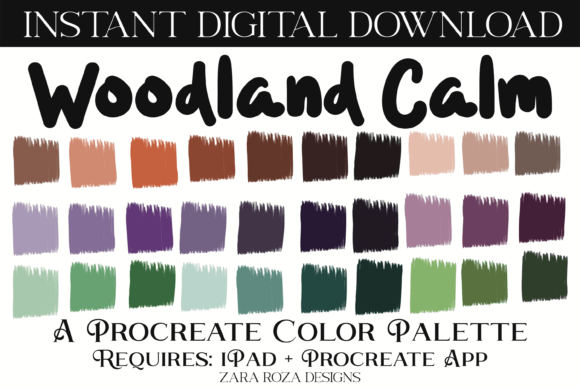
The Woodland Calm Procreate Color Palette is not merely a random assortment of hues; it is a thoughtfully constructed resource that bridges the gap between nature-inspired tones and modern digital aesthetics. The palette includes a diverse range of shades, from pastel brights and light beiges to deep browns, fairytale aubergine, lavender purple, and emerald green. This variety ensures that artists have access to both neutral grounding colors and vibrant accent tones within a single file.
By integrating these specific tones, the palette supports a wide array of artistic styles. Whether you are aiming for a soft, dreamy look with lavender and pastel shades or a bold, earthy composition using emerald green and brown, this collection provides the necessary building blocks. The inclusion of dark and light variations allows for effective shading and highlighting, which is crucial for creating depth in digital paintings and illustrations.
Key Features and Technical Specifications
When considering a digital asset like this, understanding the technical details is essential for seamless integration into your workflow. The Woodland Calm Procreate Color Palette is delivered as an instant digital download, ensuring immediate access upon purchase. Here is what is included and required:
- File Format: One .swatches file containing 30 color swatches.
- Compatibility: Exclusively compatible with the Procreate app on iPad, iPad Pro, and iPhone.
- Usage: Designed for digital art, illustration, hand lettering, and painting using the Apple Pencil.
- Delivery: Instant digital download, requiring no physical shipping.
It is important to note that this product requires the Procreate app. It is not compatible with other drawing applications such as Photoshop or Clip Studio Paint unless those apps specifically support the .swatches format, which is native to Procreate. Therefore, users must ensure they have the Procreate app installed on their iOS device before purchasing.
Versatile Applications for Digital Creators
One of the strongest attributes of the Woodland Calm Procreate Color Palette is its versatility. While the name suggests a natural, serene vibe, the inclusion of festive and vibrant tones expands its utility far beyond landscape painting. Below are several scenarios where this palette can elevate your work.
Seasonal and Festive Illustrations
Digital artists often create content for specific holidays and celebrations. The diverse range of colors in this palette makes it suitable for various occasions. For instance, the emerald green and deep brown tones are perfect for Christmas and Xmas themed artwork, while the lavender and pastel shades can be utilized for Easter designs. The rich aubergine and dark tones lend themselves well to Halloween illustrations, adding a mysterious and elegant touch. Additionally, the warm beige and brown hues are ideal for Thanksgiving graphics, capturing the essence of autumn and harvest.
Beyond winter and autumn holidays, the palette’s bright and light tones can be adapted for Valentine’s Day cards, birthday party invitations, and wedding stationery. The soft lavenders and fairytale hues create a romantic and celebratory atmosphere, making them excellent choices for bridal showers and baby showers.
Digital Planning and Scrapbooking
The rise of digital planning has created a demand for aesthetic resources that enhance productivity apps like Goodnotes, Notability, Noteshelf, and Xodo. The Woodland Calm Procreate Color Palette can be used to create custom stickers, headers, and decorative elements for digital planners. The neutral beiges and browns provide a clean, professional look for daily logs, while the brighter accents can highlight important dates or tasks. This aesthetic approach to digital planning helps users maintain motivation and organization through visually appealing layouts.
Character Design and Portrait Art
For artists focused on character design and portrait art, skin tones and hair colors are critical. The palette’s range of beige, brown, and fairytale aubergine offers unique options for stylized portraits. The lavender and emerald tones can be used for fantasy characters, adding an otherworldly quality to hair, eyes, or clothing. When combined with digital brushes and the precision of the Apple Pencil, these colors allow for detailed rendering of faces, expressions, and textures.
How to Import and Use the Palette
Getting started with the Woodland Calm Procreate Color Palette is a straightforward process. However, new users may find the import procedure slightly unfamiliar. Follow these steps to integrate the swatches into your Procreate library:
- Download the File: After purchasing, locate the .swatches file in your iPad’s Downloads folder or the location where your browser saves files.
- Open Procreate: Launch the Procreate app on your iPad.
- Access the Color Panel: Tap on the color circle in the top right corner to open the color panel.
- Navigate to Palettes: Select the "Palettes" tab at the top of the color panel.
- Import the Swatches: Tap on the "Import" button or drag and drop the .swatches file into the palettes area. The iPad should automatically recognize the file and add the 30 swatches to your library.
- Start Creating: Select the newly imported "Woodland Calm" palette and begin using the colors in your artwork.
Once imported, these colors become part of your permanent Procreate library, allowing you to access them across all your projects. This convenience saves time and ensures consistency in your artistic style.
Evaluating Suitability for Your Needs
While the Woodland Calm Procreate Color Palette offers numerous benefits, it is essential to evaluate whether it suits your specific project requirements. Consider the following factors:
- Style Alignment: If your work primarily involves neon, cyberpunk, or high-contrast industrial themes, this earthy and pastel-focused palette may not be the best fit. However, for organic, whimsical, or elegant styles, it is an excellent choice.
- Device Compatibility: Ensure you are using an iPad or iPhone with the Procreate app. This palette will not work on Android tablets or desktop computers without iOS emulation, which is not recommended for professional workflows.
- Color Theory Knowledge: While the palette is pre-curated, understanding basic color theory will help you maximize its potential. Knowing how to balance the dark aubergine with light lavender, for example, will result in more harmonious compositions.
Strengths and Limitations
The primary strength of this palette lies in its curation. Instead of spending hours selecting individual colors, artists receive a cohesive set that works well together. The inclusion of thirty swatches provides enough variety for complex illustrations without overwhelming the user. Furthermore, the instant download format means there is no wait time, allowing for immediate creative application.
A potential limitation is the fixed nature of the swatches. Users cannot modify the .swatches file directly outside of Procreate. If you need specific hex codes for web design or print production, you may need to sample the colors within Procreate and record the values manually. Additionally, since it is a digital-only product, there is no physical reference, which some traditional artists might prefer.
Enhancing Your Digital Workflow
Incorporating the Woodland Calm Procreate Color Palette into your routine can streamline your creative process. By having a reliable set of colors ready to go, you reduce decision fatigue and can focus more on composition and technique. This is particularly beneficial for professionals who manage multiple client projects, such as creating printable art prints, posters, and decor items. Consistency in color usage helps build a recognizable brand identity, which is valuable for business owners and freelance illustrators.
Moreover, the palette supports various techniques, including brush lettering and calligraphy. The contrast between the dark browns and light beiges allows for clear, legible lettering that stands out against backgrounds. When used with textured brushes, these colors can mimic traditional media like watercolor or ink, adding a tactile quality to digital works.
Conclusion
The Woodland Calm Procreate Color Palette is a valuable resource for digital artists seeking a harmonious and versatile color scheme. With its thirty carefully selected swatches ranging from pastel brights to deep earth tones, it supports a wide array of creative endeavors, from holiday illustrations to digital planning and character design. By understanding its features, compatibility, and application methods, users can effectively integrate this tool into their workflow. Whether you are a hobbyist exploring digital art or a professional creating commercial designs, this palette offers the flexibility and aesthetic appeal needed to bring your visions to life. Happy drawing!