Mastering the Avocado Procreate Palette: A Complete Guide to Brushes, Swatches, and Installation
In the vibrant world of digital illustration, having the right tools can transform a simple sketch into a masterpiece. For artists working on the iPad, Procreate has become the industry standard, offering an intuitive interface and powerful features. However, even the most skilled artist needs a reliable set of resources to streamline their workflow. This is where specialized asset packs, such as the Avocado Procreate Palette, come into play. By combining a curated color scheme, a versatile brush, and a unique stamp tool, this pack offers a cohesive aesthetic that simplifies the creative process.
Whether you are a beginner just starting your digital art journey or an experienced illustrator looking to expand your library, understanding how to effectively utilize and install these assets is crucial. This guide will walk you through the significance of the Avocado collection, explain its components, and provide clear, step-by-step instructions for installation, ensuring you can start creating immediately.
Why Choose the Avocado Aesthetic?
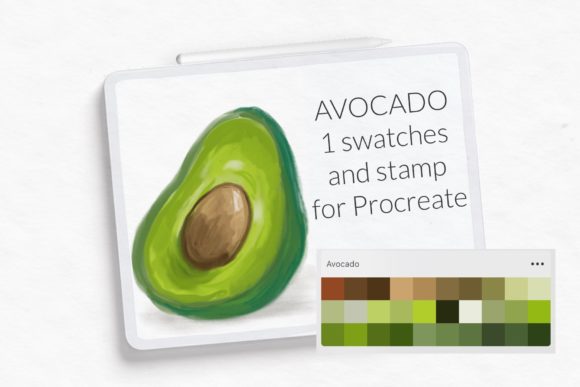
The term "Avocado" in digital art often refers to a specific, nature-inspired color palette dominated by soothing greens, earthy browns, and soft creams. This aesthetic has gained popularity due to its calming effect and versatility. It fits seamlessly into various genres, from botanical illustrations and character design to modern UI mockups and social media graphics.
Using a pre-defined palette like the Avocado color swathes saves time. Instead of endlessly tweaking hue and saturation sliders, artists can select harmonious colors instantly. This consistency helps in building a recognizable personal brand or style. Furthermore, the inclusion of a dedicated Avocado Brush ensures that the texture and flow of your strokes complement the color choices, creating a unified look across your artwork.
The Components of the Pack
To fully leverage this resource, it is important to understand what is included in the download. The Avocado Procreate pack typically contains three distinct elements:
- 1 Swatches File: This file contains a curated selection of colors. Once imported, these appear in your Color Palette library, allowing for quick access to the signature avocado tones.
- 1 Brush File: A custom-designed brush optimized for digital painting. This might be a textured ink brush, a soft watercolor simulator, or a versatile sketching tool, depending on the specific creator’s design.
- 1 Stamp Brush: A specialized tool that allows you to stamp predefined shapes or textures onto your canvas with a single tap. This is excellent for adding details like leaves, patterns, or highlights without drawing them manually every time.
How Installing Procreate Brushes and Color Palettes Works
One of the most common hurdles for new Procreate users is installing third-party assets. While the process is straightforward once you know the steps, it can seem confusing if you are unfamiliar with the iOS file system. The method described below is particularly useful for users with older iPads or those running Procreate version 4.0 or earlier, but it remains a reliable universal method for all versions.
Before beginning, ensure you have downloaded the necessary files to your iPad. These usually arrive in a compressed folder (ZIP) or as individual .brush and .swatches files. If they are in a ZIP file, tap on it in your Files app to unzip it first.
Step-by-Step Installation Guide
Follow these instructions to import your Avocado brushes and swatches correctly:
- Download files on your iPad: Save the asset pack to a location you can easily find, such as the "Downloads" folder in the Files app.
- Open the folder and choose the file: Locate the specific
.brushor.swatchesfile you wish to install. Do not open it yet; just locate it. - Tap and hold: Using your finger or Apple Pencil, press and hold on the file icon. A context menu will appear.
- Choose Share: From the menu options, select "Share." This opens the iOS sharing sheet.
- Find Procreate: Scroll through the list of apps. If you see Open in Procreate, click on it. If the option is missing, click on "More" at the end of the row.
- Enable the Option: In the "More" menu, scroll down to find Procreate. Toggle the switch to enable it, then click "Done." Now, select "Open in Procreate."
- Verify Installation: Open your project in Procreate. Click on the brush icon at the top right corner to check your Brush Library. For colors, scroll down in the color palette library and look for the new swatches under the "Imported" section or specifically labeled under © Let s Art ♡.
Troubleshooting Common Issues
Even with clear instructions, technical glitches can occur. If your brush does not appear after following the steps above, consider these common solutions:
File Corruption: Ensure the download was complete. Sometimes, interrupted downloads result in corrupted files that Procreate cannot read. Try downloading the file again.
Wrong File Type: Double-check that you are trying to import a .brush file into the brush library and a .swatches file into the color palette. Importing a swatch file as a brush will not work, and vice versa.
App Updates: If you are using a very old version of Procreate, some newer brush formats might not be compatible. Consider updating your app via the App Store to ensure full compatibility with modern asset packs.
Maximizing Your Creative Workflow
Once installed, the real magic begins. The Avocado Brush should be tested on a blank canvas to understand its pressure sensitivity and opacity behavior. Experiment with different stroke speeds to see how the texture changes. The stamp brush is particularly useful for creating repetitive patterns, such as foliage in a landscape or background textures in a portrait.
Integrating the Avocado color swathes into your daily practice can significantly speed up your coloring phase. Instead of picking colors randomly, use the palette to establish a mood board within your canvas. This approach not only saves time but also ensures color harmony throughout your piece.
For educators and students, these tools serve as excellent examples of how digital assets can enhance learning. Teachers can use pre-made palettes to teach color theory, while students can focus on composition and technique without getting bogged down by color selection fatigue.
Conclusion
The Avocado Procreate Palette, along with its accompanying brush and stamp tools, represents more than just a set of digital files; it is a gateway to a more efficient and aesthetically pleasing creative workflow. By understanding the purpose of each component and mastering the installation process, you empower yourself to create with confidence and ease.
Remember, the key to mastering digital art lies not just in the tools you own, but in how well you understand and utilize them. Take the time to explore the nuances of the Avocado brush, experiment with the swatches, and let the stamp brush add that final touch of professionalism to your work. With these resources at your fingertips, your next digital illustration on iPad is sure to stand out.
For more tips on digital art techniques and resource recommendations, keep exploring our guides and stay tuned for updates on the latest Procreate assets. Happy creating!